# 開採石油

### 一、投資**油田**（鑄造NFT）

1、 點擊下方按鈕“鑄造”

<figure><img src="/files/Eqf1BVZf8NjhSd2N3p3Y" alt=""><figcaption></figcaption></figure>

2、選擇油田類型，點擊“支付”, 在彈出的錢包對話框中點擊“確認“

<figure><img src="/files/OIKDDLYeKf6P2DvPbJgb" alt=""><figcaption></figcaption></figure>

鑄造好的油田可以在“油田”中查看。

### **二、開採石油OIL**

1、點擊下方“鑽機”（在油田上架設油井需要購買一台鑽機）

<figure><img src="/files/xSTAvJcKhyXtMTyMpovn" alt=""><figcaption></figcaption></figure>

2、在彈出的窗口中選擇付款方式，然後點擊“支付”，確認後成功購買鑽機。

<figure><img src="/files/Hx6T8LGFHx7CjlekPO57" alt=""><figcaption></figcaption></figure>

3、在需要開採的油田上點擊“架設鑽機”

<figure><img src="/files/DYOzaa6I3PBSD8zKO6rA" alt=""><figcaption></figcaption></figure>

### **三、收穫Oil**

選擇滿足收穫時間的油田，點擊油田上方Oil圖標，錢包中確認完畢即可收穫Oil.

（下一次收穫需要等待24小時，到時間未收穫，累計Oil仍繼續增加）

<figure><img src="/files/LwuDNJzw8kxAsPN6QbFk" alt=""><figcaption></figcaption></figure>

### 四、勘探增產：購買石油產量包來增加油田的產量

1、點擊右上角油”三個油桶“圖標

<figure><img src="/files/VToiOPrvjstkGd8j8WGE" alt=""><figcaption></figcaption></figure>

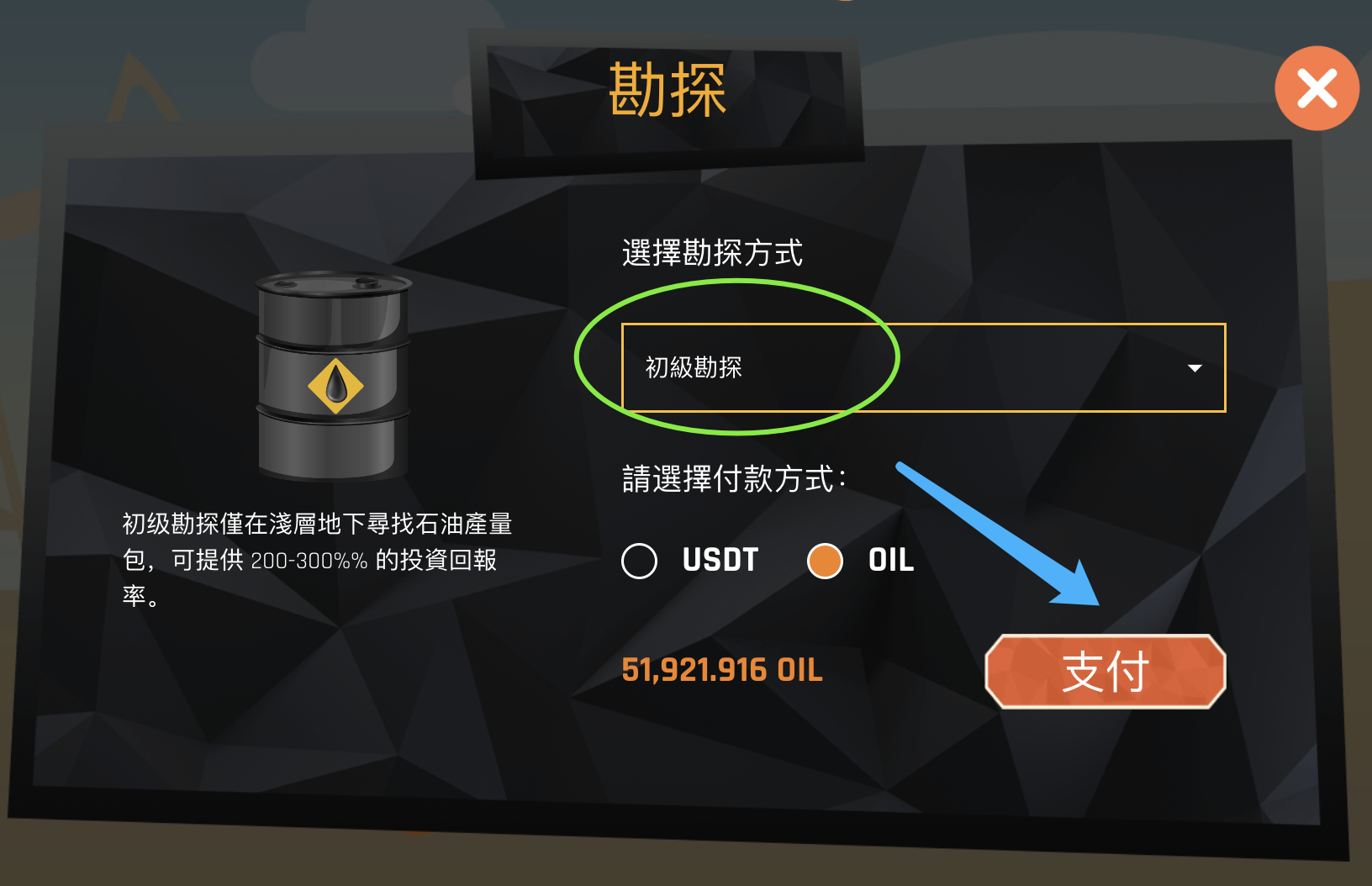
2、在彈出的窗口中按鈕中選擇勘探等級，選擇支付方式，點擊“支付”

<figure><img src="/files/o0aCg3KDvxx8Fg2NqjUm" alt=""><figcaption></figcaption></figure>

3、選擇想要增產的油田，點擊儲量旁邊的“+”

<figure><img src="/files/ZXQunuQftQBUZx4mm2Fw" alt=""><figcaption></figcaption></figure>

4、在彈出的窗口中輸入要增加的產量，然後點擊“確認”，即可實現增產。

<figure><img src="/files/s07PKcwnp4M7C27M6ZH4" alt=""><figcaption></figcaption></figure>


---

# Agent Instructions: Querying This Documentation

If you need additional information that is not directly available in this page, you can query the documentation dynamically by asking a question.

Perform an HTTP GET request on the current page URL with the `ask` query parameter:

```
GET https://docs.energycrisis.xyz/core_cn/xin-shou-zhi-nan/kai-cai-shi-you.md?ask=<question>
```

The question should be specific, self-contained, and written in natural language.
The response will contain a direct answer to the question and relevant excerpts and sources from the documentation.

Use this mechanism when the answer is not explicitly present in the current page, you need clarification or additional context, or you want to retrieve related documentation sections.